PHOTOELECTRIC SENSORS
Most photoelectric sensors that get thrown away are still healthy. The cause is usually dirt, alignment or the wrong mode for the target. Work through these seven checks in order.
PART 4 OF 25 | 4 MIN READ | BY SUBODH RAJ
The seven checks
- Look at the LED. Most sensors show output state and a stability or margin light. A flickering margin light means the signal is too weak for reliable work.
- Clean the lens. Oil mist, dust and condensation can cut the signal in half. Use a soft cloth and a lens-safe cleaner, never solvent on plastic lenses.
- Realign. For through-beam and retro-reflective types, loosen the mounting, aim until the margin LED is steady, then tighten and check again.
- Check the reflector. In retro-reflective mode the reflector must be the correct type and clean. A polarised sensor needs a polarised-prism reflector, and shiny tape or mirrors will not work.
- Match the sensor to the target. A diffuse sensor sees dark and shiny objects poorly. Black rubber may return only a small part of the light white paper does. Use background suppression, a through-beam, or a laser version.
- Adjust sensitivity. Turn the sensitivity too high and it sees the background. Turn it too low and it misses the target. Set it halfway between the 'object present' and 'object absent' points.
- Check the wiring and power. A drop in supply voltage, a loose terminal, or the wrong NPN/PNP type can look exactly like a dead sensor.
| Mode | Sees an object when | Typical weakness |
|---|
| Through-beam | The beam is cut | Needs wiring on both sides |
| Retro-reflective | The reflected beam is cut | Fooled by shiny objects unless polarised |
| Diffuse | Light bounces from the object | Range changes with colour |
| Background suppression | Object is closer than the set distance | Very glossy targets can still cause errors |
Safety: Never look into a laser sensor beam, even a low-power one. Treat it with the same care as a laser pointer.
If all seven checks pass and the sensor still fails, test it on a bench with a known target before replacing it. A bench test tells you whether the sensor or the installation is at fault, which saves you from repeating the same failure with a new part.
The 8 sensors in this part
Each card below shows the sensor in use, what it is and how it works, and where you will find it.
SENSOR 1 OF 8
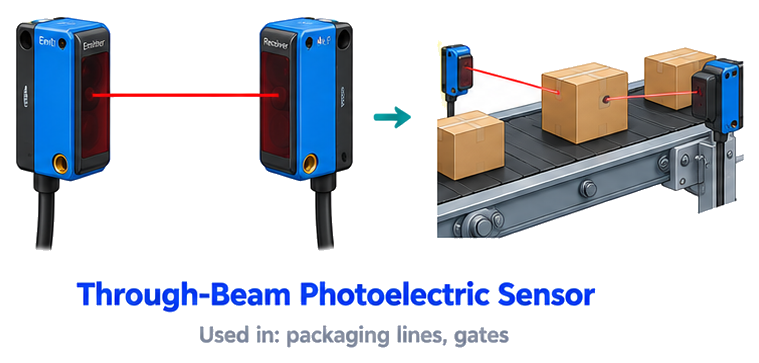
Through-Beam Photoelectric Sensor
A through-beam photoelectric sensor has two separate units: a transmitter that sends a light beam and a receiver that faces it. The output changes when an object cuts the beam. It has the longest sensing range and is the most reliable photoelectric type, because the light travels in one direction only.
USED IN
packaging linesgates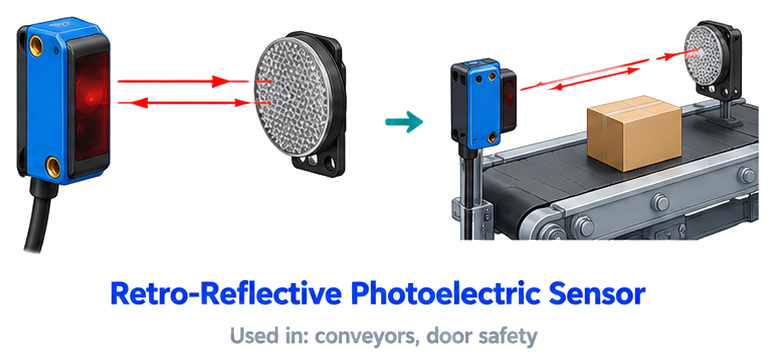
SENSOR 2 OF 8
Retro-Reflective Photoelectric Sensor
A retro-reflective photoelectric sensor has the transmitter and receiver in one housing, and a reflector (mirror) on the opposite side. The light goes to the reflector and returns to the receiver. An object that blocks this path is detected. It needs wiring on one side only, so it is easier to install than a through-beam sensor.
USED IN
conveyorsdoor safety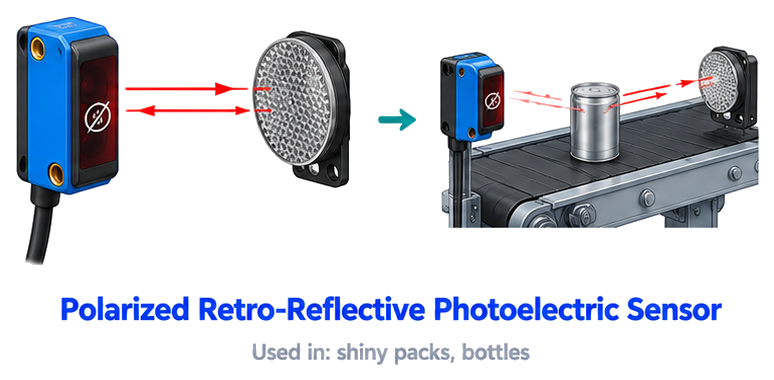
SENSOR 3 OF 8
Polarized Retro-Reflective Sensor
A polarized retro-reflective sensor uses polarising filters so that it reacts only to light coming back from its own special reflector. Shiny objects such as bottles or foil reflect light but change its polarisation, so the sensor ignores that false reflection. This avoids wrong detection on shiny items.
USED IN
shiny packsbottles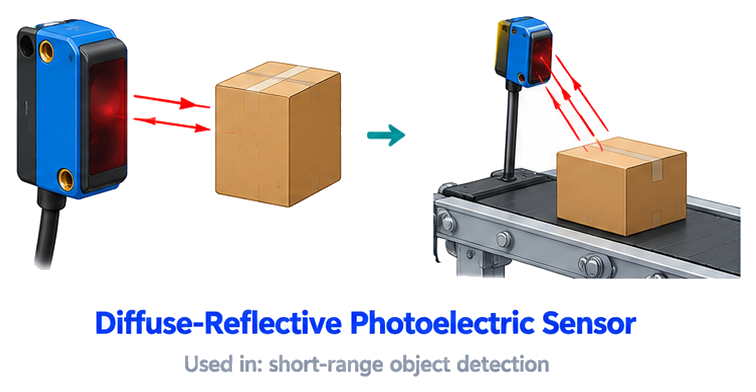
SENSOR 4 OF 8
Diffuse-Reflective Photoelectric Sensor
A diffuse-reflective photoelectric sensor has the transmitter and receiver in one housing, and no reflector is needed. The light hits the object itself and part of it bounces back to the receiver. It is easy to install, but the range depends on the colour and surface of the object, so it is best for short-distance detection.
USED IN
short-range object detection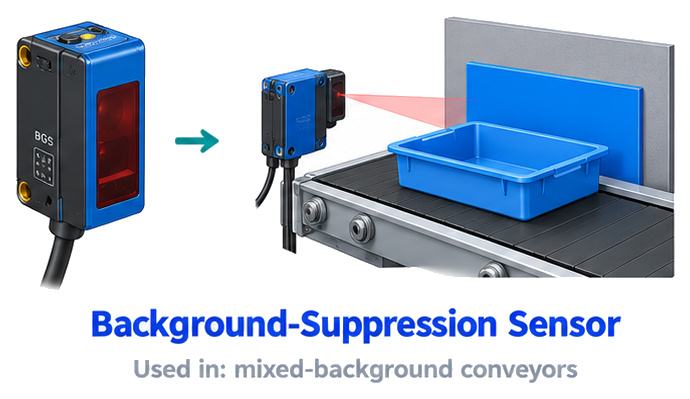
SENSOR 5 OF 8
Background-Suppression Sensor
A background-suppression sensor detects an object only within a set distance and ignores everything behind it. It measures the angle of the returning light, using triangulation, so the colour of the object or the background does not matter much. It is used where the background is close, moving or reflective.
USED IN
mixed-background conveyors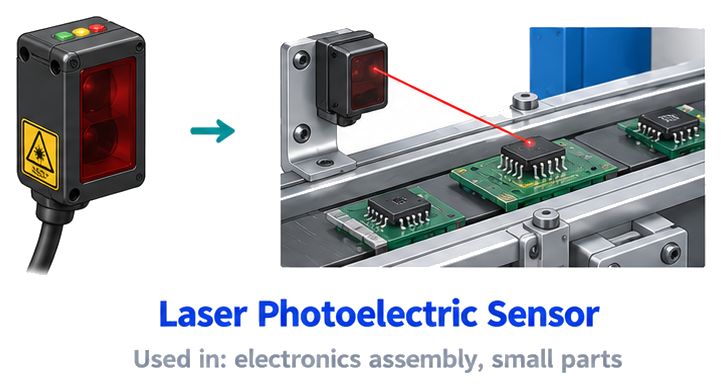
SENSOR 6 OF 8
Laser Photoelectric Sensor
A laser photoelectric sensor uses a thin laser beam instead of normal LED light. The small, bright spot can detect very tiny objects and positions accurately, and works over longer distances. It is used for small parts, electronics assembly and exact positioning, where a normal sensor spot would be too big.
USED IN
electronics assemblysmall parts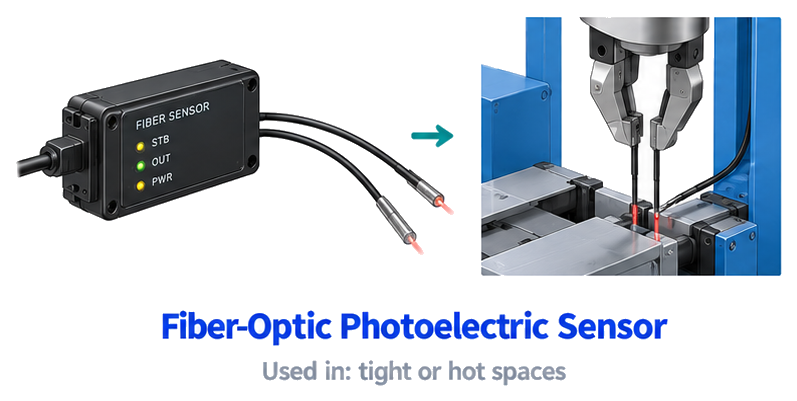
SENSOR 7 OF 8
Fiber-Optic Photoelectric Sensor
A fiber-optic photoelectric sensor sends light through thin glass or plastic fibres to a tiny sensing head. The electronics stay in a safe place while the thin fibre reaches tight, hot or dirty spaces. It can detect very small objects and is used in electronics, semiconductor machines and places with high temperature.
USED IN
tight or hot spaces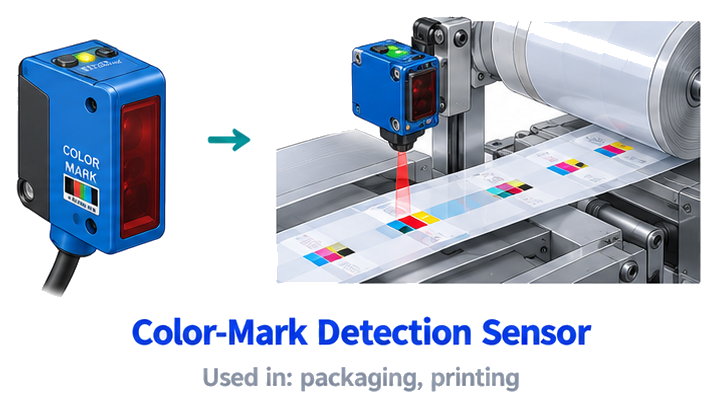
SENSOR 8 OF 8
Color-Mark Detection Sensor
A color-mark detection sensor detects a printed mark on a material by checking how much light the mark reflects compared with the background. It can pick a specific colour or contrast. It is used on packaging and printing machines to cut, seal or position the film exactly at the printed mark.
USED IN
packagingprintingWant all 250+ sensors in one place?
The Master Sensor Handbook explains every sensor with its picture, definition and where it is used.
Buy the Master Sensor Handbook | INR 199Tap the button to message us on WhatsApp
Written by Subodh Raj,
EngineerX Academy. Part 4 of 25 in the Industrial Sensors series.
Comments
Post a Comment